Should I disable 2.4GHz on my wireless network?
I was prompted to write this article after a chat with a customer who proudly said ’Thankfully we have now got rid of all 2.4GHz from our network’
This struck me as surprising, as 2.4GHz is not something that would degrade your network as for example legacy 802.11b clients might. 2.4GHz is a frequency spectrum that is available to use. A highway planner would not close minor routes because they are not performing as well as the major routes. Both would be used as they can share the traffic load, and each have their own advantages for certain applications.
A quick search of the title question will return several articles explaining how and why network managers should be disabling the 2.4GHz band on their wireless network. A lot of this has been a result of the 802.11ac standard that has excluded the 2.4GHz band. I would agree that the 2.4GHz band has it’s disadvantages but its far from the ‘dead duck’ that it is often described.
This article aims to show how the 2.4GHz frequency band still has many strengths and can be utilised to great advantage in a wireless network.
Review of the issues with 2.4GHz
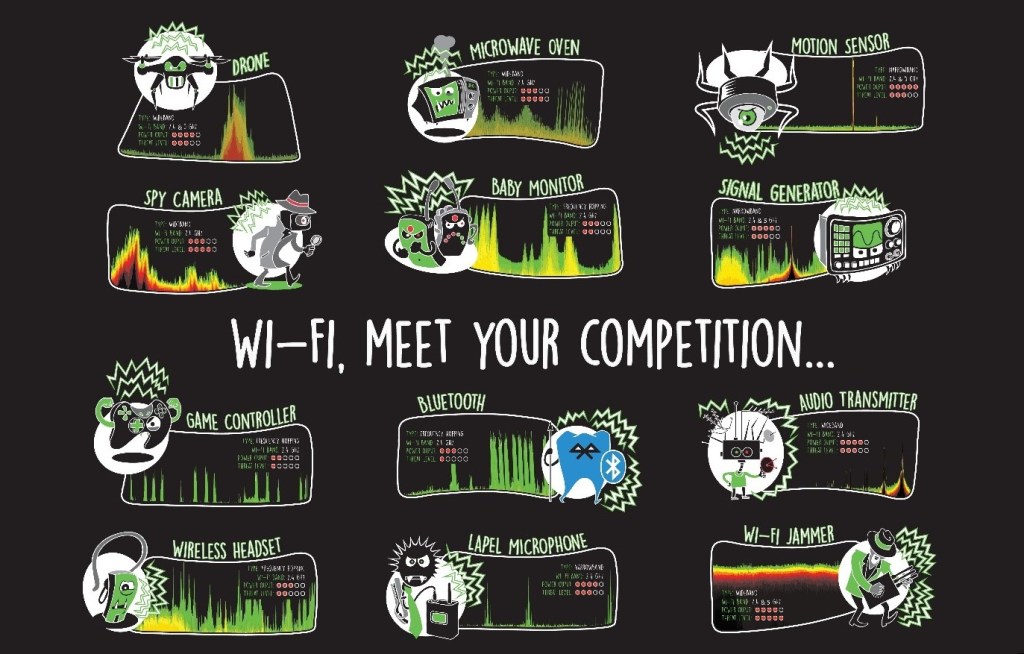
The main issue with using the 2.4GHz spectrum is interference. As the spectrum is unregulated any manufacturer of a wireless device can choose to use it. There are therefore many devices designed to use the 2.4GHz frequency range. Some of these are highlighted in figure 1 below. These devices will not use the IEEE 802.11 standards for communications. These standards define the rules to allow multiple device to transmit on the same channel. 802.11 wi-fi devices will allow time for each other to transmit and therefore reducing interference and transmit retries. The non-wi-fi devices below will not obey these rules and in some cases will transmit constantly. This interference essentially raises the noise floor, reducing the signal-to noise ratio and reducing the reliability of the Wi-Fi communication.
When to use 5GHz
When high performance is required, for example with voice or video applications, regular, uninhibited access to the airspace is essential. For these applications, the relatively low utilisation of the 5GHz frequency band is far better that 2.4GHz. Due to the higher number of channels available, the separation between the channels and fewer number of devices using the spectrum, the 5Ghz spectrum is in most cases the better choice. The following section explains those times when this is not the case.
Advantages of 2.4GHz
The big advantage of 2.4GHz is the fundamental properties allowing it to propagate significantly further than 5GHz. This is down to the absorption of microwaves by moisture in the atmosphere being more pronounced as the frequency increases. This is something you will likely have noticed with your home network. The 2.4GHz band penetrates through walls more effectively and will be useable in many more areas of the home.
DFS
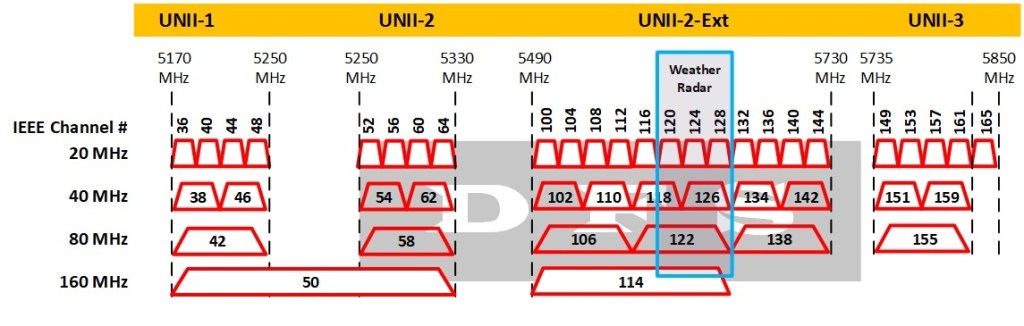
The 2.4GHz spectrum is not affected by weather radar and DFS restrictions. One of the conditions for devices using the 5GHz UNII-2 spectrum is that they must switch channels if radar is detected. These are often referred to as the DFS channels. Figure 2 shows the 5GHz channel range for the UK. All but the first 4 (UNII I) channels are marked as DFS. This means that Dynamic Frequency Select must be enabled – essentially the channel cannot be configured statically. DFS has a function whereby if radar is detected, then the access point must move to a non-DFS channel for 30 minutes before being allowed to change back. This can be very disruptive for clients. Although the access point is allowed 10 seconds to inform all clients before switching channels, this process is not reliable in practice and often clients will need to re-scan for an available access point.
IoT
IoT devices in most cases will use only 2.4GHz. As 2.4GHz propagates better a 2.4GHz radio does not need to be as large or as complex as the equivalent 5GHz radio. High performance is not a requirement for IoT devices, but size and cost certainly are.
High Density
In a high density office environment the 5GHz band will be used for high demands of the corporate network where video conferencing and voice roaming is likely to exist. This leaves the 2.4GHz band for less demanding clients. Guest clients for example usually only need to check emails or browse the Internet. The relatively lower performing 2.4GHz band can serve these less demanding clients leaving the 5GHz band less congested.
Example design
To take advantage of the different properties and applications for the 2.4GHz and 5GHz band, AP design can be considered separately for dual band (both 2.4GHz and 5GHz) and dual 5GHz (two 5GHz) radios.
As the 2.4GHz band propagates further, it can be enabled on fewer APs. This reduces co-channel interference in the 2.4GHz band and allows for the use of dual 5GHz radios for improved capacity. This works particularly well in environments requiring a high AP density.
When designing The AP placement, this would follow the guidelines for the required coverage assuming only one 5GHz radio on each access point. This will define the coverage and AP density for the worst-case scenario. It’s important that the physical placement design gives you the options to fine tune the design after the APs have been installed. Once the AP locations are planned, the choice of dual band or dual 5GHz configuration will follow the following design considerations:
- Dual band APs in approximately 50% of locations
- Dual band APs in isolated and perimeter locations
- Dual 5GHz in high user density areas
- Dual band APs in meeting rooms and pinch points
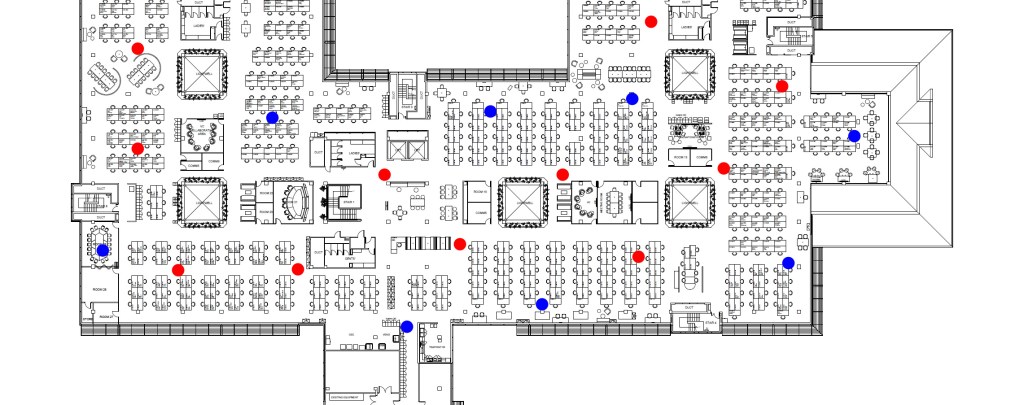
The following floor plan shows an example design where a mixture of access points with dual 5GHz and dual band radios are used. The dual 5GHz radio APs are shown in red, The Blue dots show dual band APs.
Conclusions
The physical properties of, and the RF environment in which the 2.4GHz and 5GHz frequency bands exist have significantly different properties, and thus should be considered differently when designing your Wi-Fi network.
Knowledge of these properties can be used to enhance the design of the 2.4GHz and 5GHz networks, where each is designed to take advantage of their particular properties and how they can be applied into different environments.
For assistance with your wi-fi design please get in touch with Forfusion at …..
References and further reading.
- Wi-Fi Nigel: The 5GHz “Problem” For Wi-Fi Networks: DFS
- Silex Technology: Changes to the 5GHz Wi-Fi band in the UK
- Ekahau Infographic:
- Troubleshooting Non-Wi-Fi Interference Using Spectrum Analyser
- How (and Why) to Disable 2.4GHz Wi-Fi on Your Network
 Wireless Networking by Ash Mead